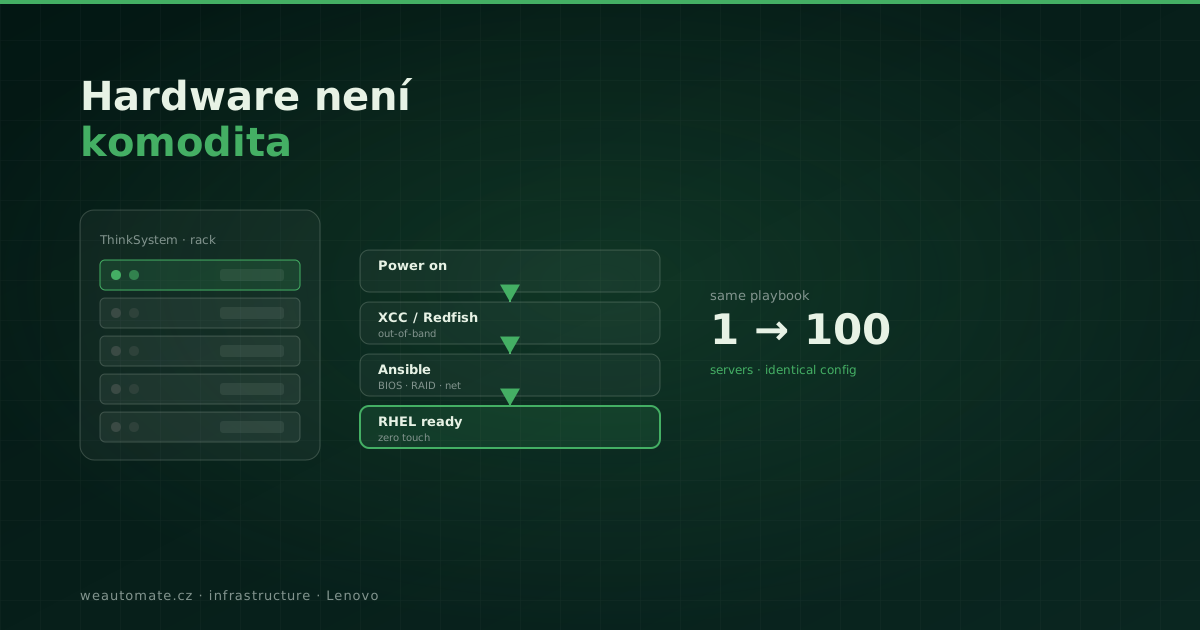
Hardware gets talked about as a commodity — a piece of metal things run on. But automation starts right there. And if your server cannot say "I am on, configure me" without someone standing next to it, automation hits a wall at the first meter.
Why Lenovo ThinkSystem
Lenovo is the world's largest PC maker, with a portfolio from ThinkPad to ThinkSystem servers and storage. For us the key is the XClarity Controller (XCC) — out-of-band management that lets you drive a server via the Redfish API before any OS is running.
Zero-touch provisioning
A real scenario: a new ThinkSystem server arrives in the rack. Ansible connects via XCC, configures BIOS, RAID and network, boots a RHEL install, and once the OS is ready hands it over to NetBox and chains application automation. No human required.
- Redfish API — standardized hardware control by code.
- Scalable — the same playbook for one server or a hundred.
- Consistency — every server configured identically, no manual exceptions.
# Zero-touch provisioning via Redfish — power-on to OS without a server-room visit
- name: Configure and boot a new ThinkSystem server
  hosts: new_servers          # new servers in the rack
  gather_facts: false
  tasks:
    - name: Set BIOS via XCC (out-of-band)
      community.general.redfish_config:
        category: Systems
        command: SetBiosAttributes
        baseuri: "{{ xcc_ip }}"     # XClarity Controller, OS not running yet
        username: "{{ xcc_user }}"
        password: "{{ xcc_pass }}"
        bios_attributes:
          BootMode: "UEFI"
          SecureBoot: "Enabled"
    - name: Power on the server remotely
      community.general.redfish_command:
        category: Systems
        command: PowerOn
        baseuri: "{{ xcc_ip }}"
        username: "{{ xcc_user }}"
        password: "{{ xcc_pass }}"
    - name: Register into NetBox
      ansible.builtin.uri:
        url: "https://netbox.internal/api/dcim/devices/"
        method: POST              # the server adds itself to inventory
Key point: XCC (XClarity Controller) lets you drive the server via the Redfish API before any OS runs. A standardized interface, no vendor lock-in. See the Redfish standard.
Preparing a new server (BIOS, RAID, network, OS) took an engineer ~2 days including trips to the DC. With zero-touch provisioning: 35 minutes, no physical presence, fully consistent. Illustrative figures — verify before publishing.
Reality check
Out-of-band management is not magic — it needs proper management-port networking and disciplined inventory. But once you have it, server provisioning shrinks from days to minutes.
Frequently asked questions
Is Redfish only for Lenovo, or others too?
Redfish is an open standard (DMTF) — supported by Lenovo (XCC), Dell (iDRAC), HPE (iLO) and others. We build vendor-neutral, so the same approach works across manufacturers. Lenovo ThinkSystem is just one well-supported option.
What do we need for this to work?
Mainly properly networked management ports (XCC/BMC) in a separate management network and disciplined inventory in NetBox. Once you have that, provisioning is a matter of running a playbook.
Is out-of-band management secure?
With proper design, yes — the management network is separate from production, access via RBAC, credentials from Vault. A badly networked BMC is a risk, which is why network design is the first step.
Can it handle bulk deployment of dozens of servers?
Yes — the same playbook runs for one server or a hundred, in parallel. Each server comes out configured identically, with no "manual exceptions" that cause operational problems.
Driving to the server room for every box?
Book a 20-minute call — we'll show how to set up zero-touch provisioning and stop physically handling hardware. No sales pitch.
Book a 20-min call →